Here you will get detailed information about joins in SQL.
Join is a very basic concept in SQL which can be confusing at times. The joins are used when we need to find out the solution to a query involving the attributes of more than one table which have at least one attribute in common. Hence the need of join is pretty much clear in itself. There are different types of join which are used for different purposes.
Joins in SQL
Let’s say we have two tables, a table named STUDENT and the other table named TEACHER.
The first table “STUDENT” stores the reference details of the student and the second table “TEACHER” stores the details of the teachers who are in the school and the class they are teaching.
STUDENT
| ClassID | Name | House address |
| 101 | Raj | xyz |
| 201 | Varun | byc |
| 301 | Chittiz | abc |
| 401 | Hema | def |
TEACHER
| Teacher id | Class name | ClassID |
| 1 | First | 101 |
| 2 | Second | 201 |
| 3 | Third | 301 |
| 4 | Fourth | 401 |
In the second table, the “ClassID” is a foreign key which is used as a reference of the first table in the second one.
Now, if we want to find out the name of the student whose teacher id is 1; we need to find the join of the above mentioned tables since it requires us to gather the information of both the tables. Hence, the joins are only used where both the tables have at least one attribute (here ClassID) in common and we need to find the solution to a query which involves the attributes from both the tables.
Types of Join
Basically there are four types of joins namely, inner join, left join, right join, full outer join. The explanation of each one of the mentioned joins is as given below.
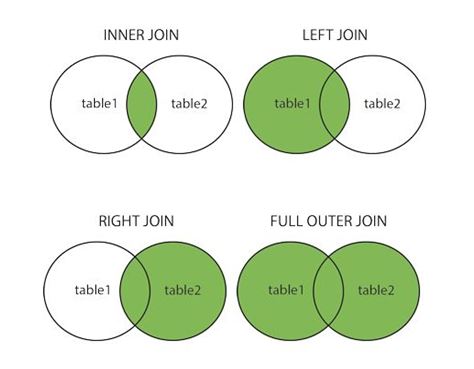
1. Inner Join
Let us consider the following two tables, the first table’s name is Country (saves the id of different countries) and the other table’s name is State (saves the various states in those countries).
COUNTRY
| CountryId | CountryName |
| 1 | China |
| 2 | India |
| 3 | USA |
STATE
| StateId | CountryId | StateName |
| 01 | 2 | GOA |
| 02 | 2 | RAJASTHAN |
| 03 | 5 | KATHMANDU |
| 04 | 6 | ISLAMABAD |
select * from COUNTRY
inner join STATE
on COUNTRY.CountryId=STATE.CountryId
The above mentioned command applies an inner join on the two table, since the common attribute is Country id, we have applied the join on the same.
The inner join returns all the matching values from both the tables. Here, in table State, since the only matching CountryId value in the country table is {CountryId = 2}, as a result of the inner join we will get the following result:
| CountryId | CountryName | StateId | StateName |
| 2 | India | 01 | GOA |
| 2 | India | 02 | RAJASTHAN |
2. Right Join
The right (or right outer join) on the other hand, displays the data which is common in both the tables, as well as the data which is present in the right table (exclusively).
This basically means that the entire right table’s data would be displayed on application of a right join.
When there is no match in the Left Table, it displays NULL.
Example:
COUNTRY
| CountryId | CountryName |
| 1 | China |
| 2 | India |
| 3 | USA |
STATE
| StateId | CountryId | StateName |
| 01 | 2 | GOA |
| 02 | 2 | RAJASTHAN |
| 03 | 5 | KATHMANDU |
| 04 | 6 | ISLAMABAD |
select * from COUNTRY
right join STATE
on COUNTRY.CountryId=STATE.CountryId
The above mentioned command applies a right join on the two tables, since the common attribute is CountryId; we have applied the join on CountryId itself.
The right table is the second table we refer to.
We would get the following table as a result of the application of the right join:
| CountryId | CountryName | StateId | StateName |
| 2 | India | 01 | GOA |
| 2 | India | 02 | RAJASTHAN |
| 5 | NULL | 03 | KATHMANDU |
| 6 | NULL | 04 | ISLAMABAD |
In the result, it is clearly depicted that the values in the Left Table which have absolutely no matching values in the Right one are not being displayed. Only those values of the Left Table are displayed which have common attributes with the Right one. Whereas all the values in the Right Table are displayed. The rows in the Right Table with no match in the Left Table are displayed as NULL (Empty).
3. Left Join
The left join (or left outer join) on the other hand, displays the data which is common in both the tables, as well as the data which is present in the left table (exclusively).
This basically means that the entire Left Table’s data would be displayed on application of a Left Join.
When there is no match in the Left Table, it displays NULL.
COUNTRY
| CountryId | CountryName |
| 1 | China |
| 2 | India |
| 3 | USA |
STATE
| StateId | CountryId | StateName |
| 01 | 2 | GOA |
| 02 | 2 | RAJASTHAN |
| 03 | 5 | KATHMANDU |
| 04 | 6 | ISLAMABAD |
select * from COUNTRY
left join STATE
on COUNTRY.CountryId =STATE.CountryId
The above mentioned command applies a Left Join on the two tables, since the common attribute is CountryId; we have applied the join on Countryid itself.
The Left Table is the first table we refer to.
We would get the following table as a result on application of left join:
| CountryId | CountryName | Stateid | Statename |
| 1 | China | NULL | NULL |
| 2 | India | 01 | GOA |
| 2 | India | 02 | RAJASTHAN |
| 3 | USA | NULL | NULL |
In the result, it is clearly depicted that the values in the right column which have absolutely no matching values in the left one are not being displayed. Only those attributes of the right column are displayed which have common attributes with the left one. Whereas all the values in the Left Table are displayed. The rows in the Left Table with no match in the Right Table are displayed as NULL (Empty)
4. Full Outer Join
The Full Outer Join, as the name suggests, shows all the content of both the tables. The Full Outer Join returns all matching records from both the tables whether the other table matches or not.
COUNTRY
| CountryId | CountryName |
| 1 | China |
| 2 | India |
| 3 | USA |
STATE
| StateId | CountryId | StateName |
| 01 | 2 | GOA |
| 02 | 2 | RAJASTHAN |
| 03 | 5 | KATHMANDU |
| 04 | 6 | CANADA |
select * from COUNTRY
full outer join STATE
on COUNTRY.CountryId=TEACHER.CountryId
The above mentioned command applies a Full Outer Join on the two tables, since the common attribute is CountryId; we have applied the join on Countryid itself.
We would get the following table as a result on application of Full Outer Join:
| CountryId | CountryName | Stateid | Statename |
| 1 | China | NULL | NULL |
| 2 | India | 01 | GOA |
| 2 | India | 02 | RAJASTHAN |
| 3 | USA | NULL | NULL |
| NULL | NULL | 03 | KATHMANDU |
| NULL | NULL | 04 | ISLAMABAD |
This Join results in all the rows. We get NULL (Empty), when there is no match.
Joins are essentially important to work with tables in SQL and the above mentioned description genuinely elaborate the usage of each one of them.
Comment down below if you have any queries related to SQL joins.
The post Joins in SQL – Inner, Outer, Left and Right Join appeared first on The Crazy Programmer.